
Home / Business Solutions / Fast Food POS
Fast Food POS · Sizzle
Sizzle — fast food and restaurant POS software
Sizzle is EGuruz’s point-of-sale software for fast food outlets, burger and pizza shops and takeaways. Orders are taken in English or Urdu, the kitchen gets its own ticket, and the owner sees every rupee by cash and JazzCash.
- English and Urdu menu
- Dine in, takeaway, delivery
- Kitchen tickets
- Works without internet
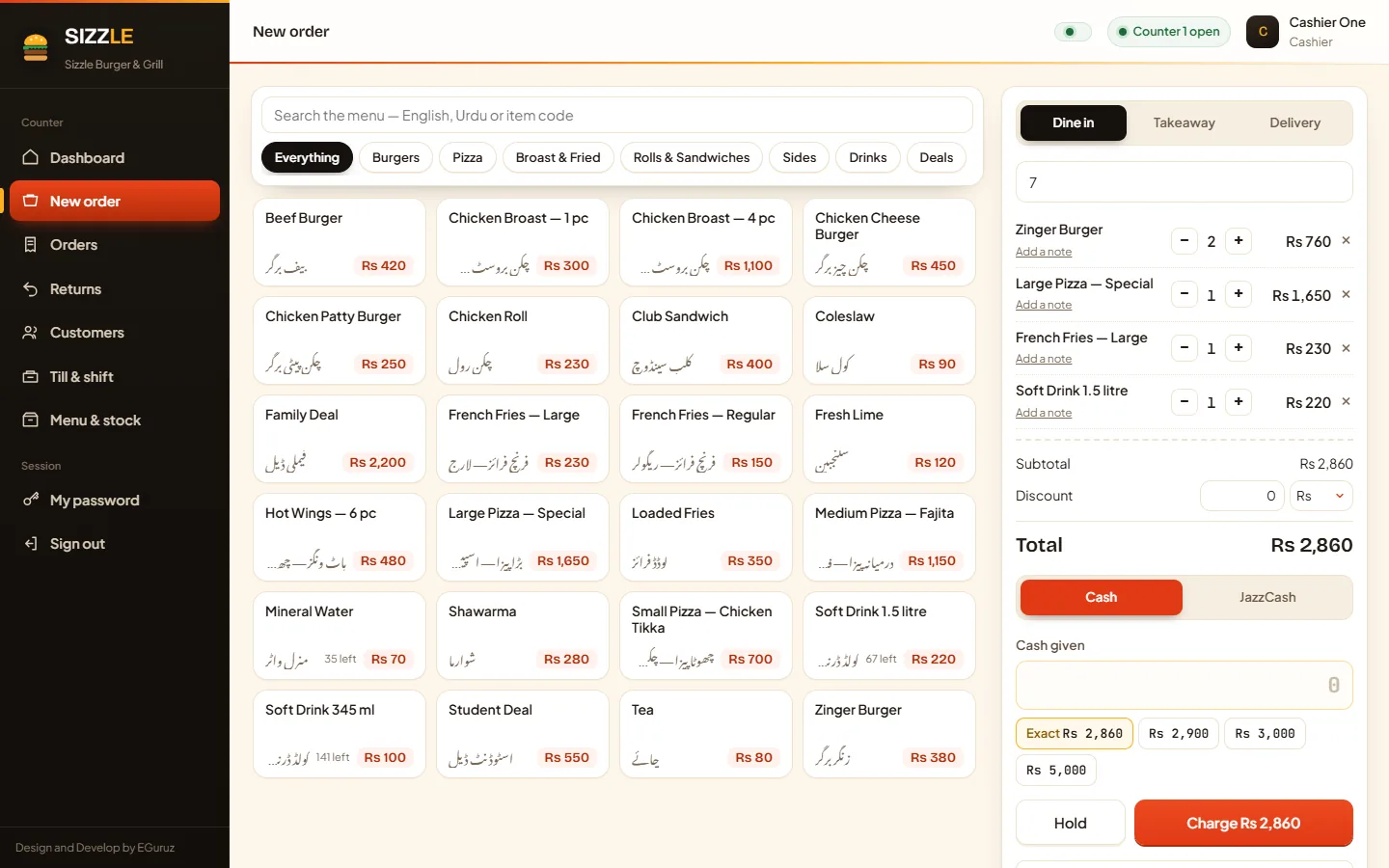
Taking orders
Built for the rush at the counter.
Tap items on the menu grid, add a kitchen note to any line, choose the order type and charge — in a few seconds.
- Search the menu in English, Urdu or by item code
- Dine in with a table number, takeaway, or delivery with name, phone and address
- Kitchen notes on each line: no onion, extra sauce, well done
- Hold an order and finish it at any counter
- Cash with quick-change buttons, or JazzCash — kept apart in every report


Menu and stock
Your menu in both languages, with the real margin.
Every item carries an English and an Urdu name, a cost price and a sale price, and the margin is worked out as you type.
- Categories with their own colours, in English and Urdu
- Cooked-to-order items need no stock; bottles, cans and packets are counted
- Receiving stock keeps a weighted average cost, so margins stay honest
- Wastage and corrections need a reason and are signed by name
- Cashiers see sale prices only — cost and margin stay with managers
Orders
Every order, easy to find again.
Filter orders by date, type, invoice, customer, phone or table, and reprint either slip at any time.
- Takings, gross profit and average order for any date range
- Dine-in, takeaway and delivery orders side by side
- Who took each order, on which counter, and how it was paid
- Customers saved from delivery orders, filled in again from their phone number


Deal suggestions
Ideas from your own sales — a person decides.
Sizzle reads the sales the shop has already taken and now and then suggests a deal or flags an item that has slowed down, always with the numbers behind it.
- Each item judged against its own category, not against the best-selling burger
- Slowing items flagged separately, because the answer is rarely “bundle it”
- Nothing changes on the menu unless a manager accepts it
- A record of how each accepted deal actually did
- Ramadan, Eid and the weather can be tagged, so like is compared with like
Reports
Know what sold and what you kept.
Seven reports share one date range with quick presets, and every one downloads as a PDF or a CSV.
- Sales by day, with cash and JazzCash in their own columns
- Profit from the cost at the moment of sale, so old margins never change
- Best sellers, stock on hand and wastage
- Returns, and every till shift with expected and counted cash
- CSV keeps the Urdu names and opens straight in Excel

Also included
Everything else a busy kitchen runs on.
01
Deals and combos
A combo has its own price, is costed from its parts, and its parts come off the shelf.
02
Menu windows
Put an item on the menu only between two times — handy for quiet-hours deals.
03
Returns done properly
Refunds at what was actually paid, across repeat visits, with a choice to restock or not.
04
Till shifts
Opening float, cash in and out with a reason, and expected against counted cash at close.
05
Roles and security
Cashier, manager and owner roles, a lock after five wrong passwords and an audit log.
06
Several counters at once
Two counters can never sell the same last bottle, and a double tap charges once.
07
Nightly backup
An automatic backup every night to a folder or USB stick you choose, with restore built in.
08
One-touch printing
With the free Print Helper, both slips print in about a second with no print dialog.
09
Works offline
Runs on your shop PC and network, with nothing loaded from the internet.
How it works
From demo to your first sale.
01
See it working
We show you Sizzle running with a sample menu and note how your kitchen and counters work.
02
Set up for your outlet
We install it on your shop PC, add your menu in English and Urdu, your staff, counters and slip details.
03
Support and updates
When a new version is ready, it installs over the old one and keeps your sales, menu and staff.
Questions
Fast food POS questions, answered.
Can the menu be in Urdu?
Yes. Every item and category has an English and an Urdu name, cashiers can search in either, and both are printed on the customer slip.
Does the kitchen get its own ticket?
Yes. Every order prints a customer slip and a kitchen ticket with the items in large type and any notes, and no prices. One Print button can print both, or each can have its own button.
Which payments does it take?
Cash and JazzCash. They are kept apart everywhere, so only cash is counted against the drawer when a counter closes.
Does it need internet?
No. Sizzle runs entirely on your shop PC and network — even its fonts are inside the app.
Can I sell deals and combos?
Yes. A deal has its own price, is costed from its parts, takes its parts off the shelf, and lists what is inside on the kitchen ticket.
Does it work with FBR digital invoicing?
FBR integration is not part of the standard version. If your outlet needs FBR (PRAL) digital invoicing, we can add it and connect it as part of your setup.
Sizzle
See Sizzle running for your outlet.
We’ll show it with a sample menu and talk through how your orders and kitchen work. Looking for something else? See all our business solutions.